
Library Browsing
Librariarr provides a rich browsing experience for movies, series, and music with extensive filtering, multiple view modes, and detailed metadata panels.
Global Search
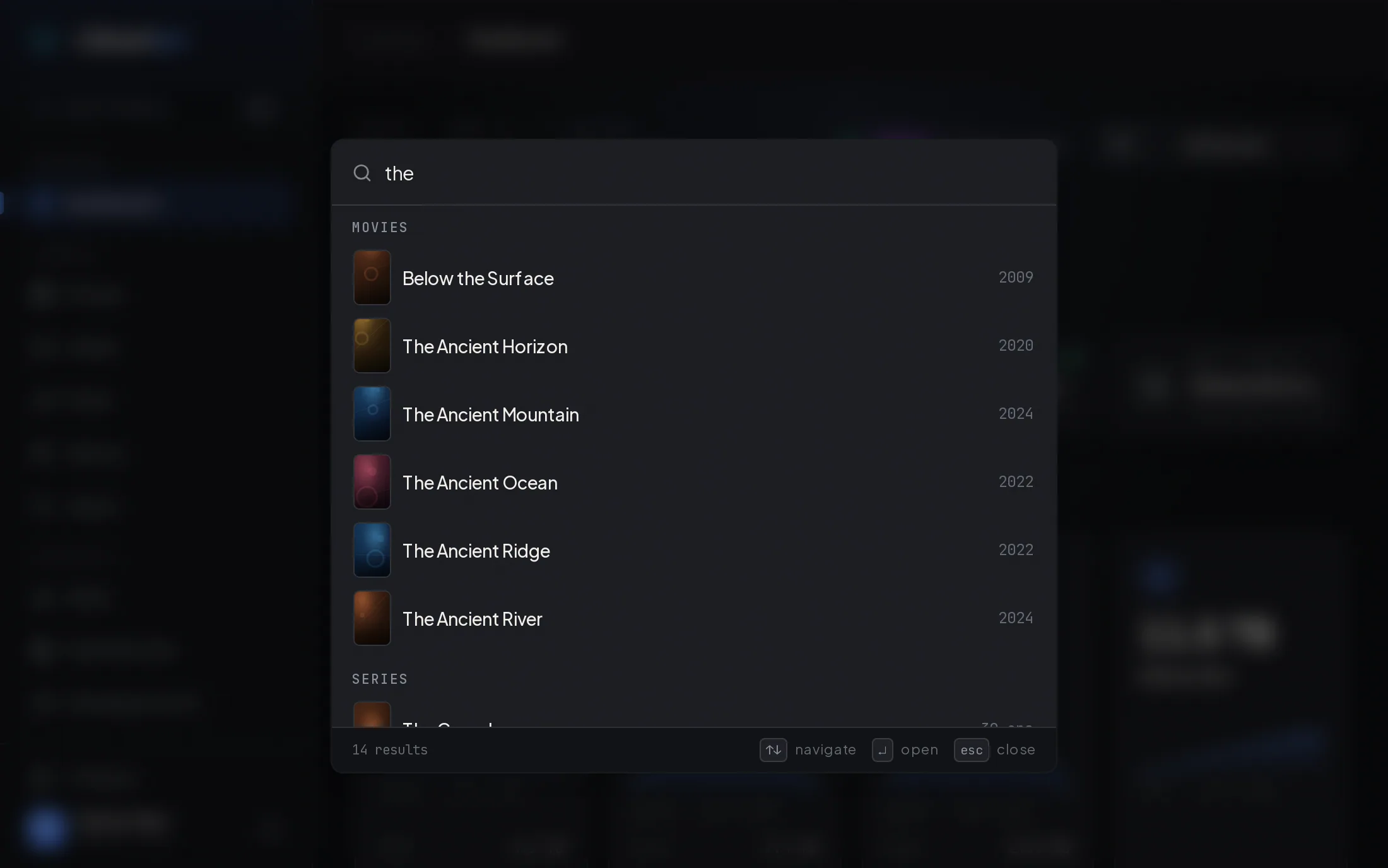
Section titled “Global Search”The Search library field in the sidebar (or ⌘K / Ctrl+K from anywhere) opens a quick title search across your entire library. Results are grouped into Movies, Series, Artists, and Albums; selecting one jumps straight to its detail page. For filter-based queries and bulk actions, the palette links to the Query Builder.
Library Views
Section titled “Library Views”Movies
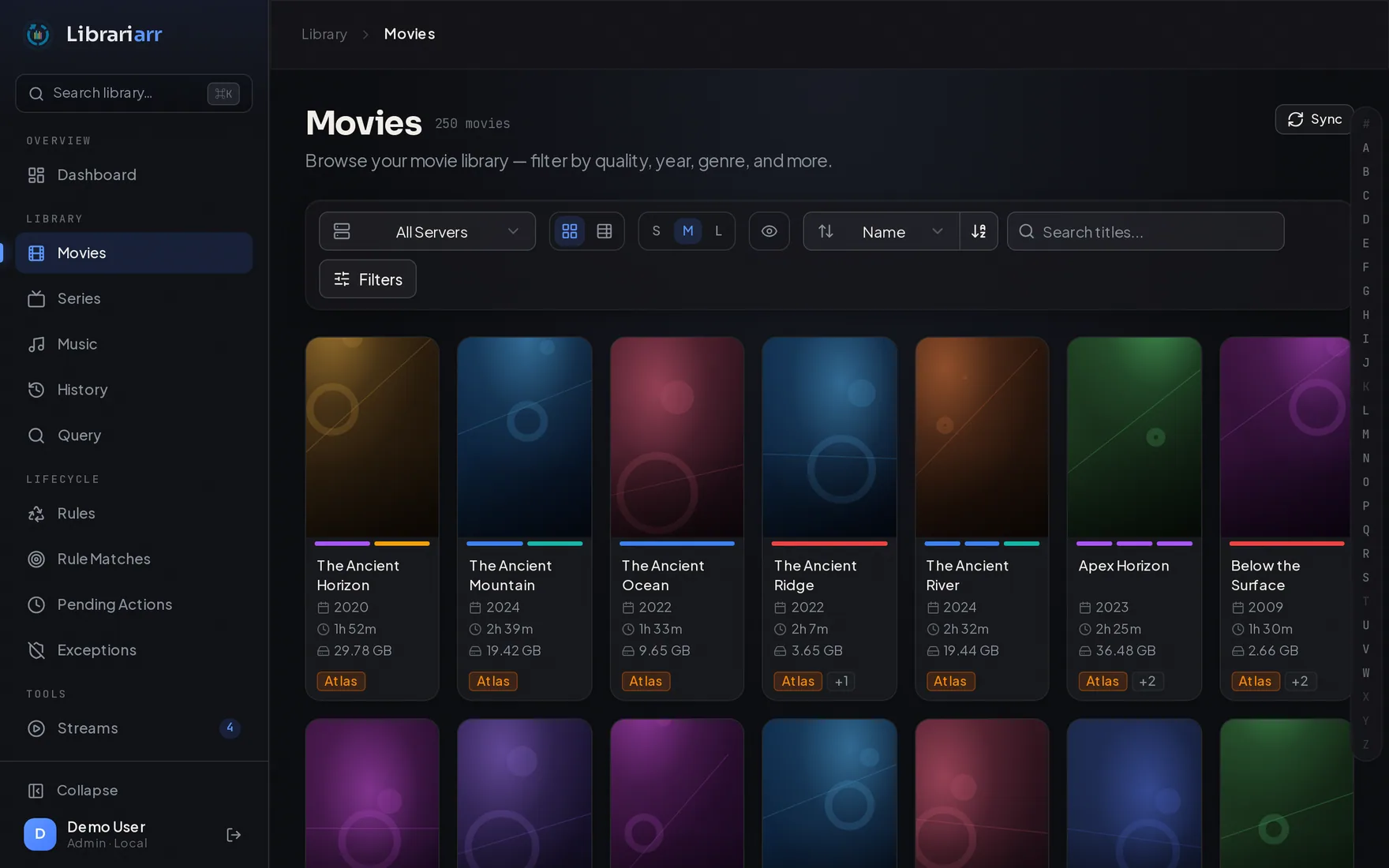
Section titled “Movies”Browse all movies with poster artwork, metadata, and quality information.
Series
Section titled “Series”Series are grouped by show identity, not just by title. Drill down into:
- Seasons — View seasons within a series with episode counts
- Episodes — Individual episodes with per-episode metadata and quality info
Episodes with no season number are listed under season 0 (Specials), together with any episodes numbered season 0, and the Specials page and its watch history include them.
Anywhere an episode is shown on its own, outside its show’s pages, it is named by its show and its season and episode number, for example Breaking Bad S01E01. This applies on the All Episodes grid, the History page, Query results, hover cards and detail panels. The episode’s own title appears as extra detail. An episode that has no season or episode number is shown as its show followed by its own title. The All Episodes list is ordered the same way by default: by show, then season and episode.
Each of these pages also carries a watch history section listing the individual plays for whatever you are looking at.
Two different shows that happen to share a title — The Office (UK) and The Office (US), or the 1978 and 2004 Battlestar Galactica — appear as separate rows, each with its own seasons, episodes, and watch history. Shows are matched by their series-level TVDB id (TMDB as a fallback, and the show title only when neither id is present), so the same show that exists on more than one server still shows up as a single merged row.
Music is organized by artist. Browse artists, albums, and individual tracks with audio format, quality, and duration details.
Albums are grouped by artist and album title ignoring letter case and spaces at either end, so Moon Safari and moon safari are one album. Tracks with no album title (or a blank one) are gathered on an Unknown Album card for their artist, and tracks with no artist under Unknown Artist. An artist’s album count, the album cards on the artist page and the Albums tab all use this grouping, and an album page lists exactly the tracks its card counts.
View Modes
Section titled “View Modes”Toggle between two view modes:
| Mode | Description |
|---|---|
| Table | Detailed rows with columns for title, year, resolution, codec, audio, file size, play count, and more. Columns are resizable via drag-to-resize. The columns you show are saved per library type and follow you to every other open tab and device. |
| Card | Poster cards in a responsive grid. Three sizes (S, M, L), plus a control for which details each card shows. |
Both views use smooth scrolling, so libraries of any size load and render without pagination. On desktop, the toolbar — search, sort, view controls, and filters — stays pinned to the top of the page while you scroll; on mobile it scrolls with the page to leave more room for content.
Alphabet Navigation
Section titled “Alphabet Navigation”A clickable alphabet bar (A–Z plus # for non-alphabetic titles) lets you jump directly to a letter. The bar highlights which letters have matching items.
Filters
Section titled “Filters”Over 30 filters are available, grouped into Video, Audio, Streams, Content, File and Dates sections (the Video section is hidden on Music); a search box at the top of the panel finds a filter by name. Filters can be combined — multiple active filters apply with AND logic.
Video Filters
Section titled “Video Filters”| Filter | Type | Example |
|---|---|---|
| Resolution | Multi-select | 4K, 1080P, 720P, 480P, SD |
| Video Codec | Multi-select (contains) | H.264, H.265, AV1 |
| Dynamic Range | Multi-select (exact) | SDR, HDR10, HDR10+, Dolby Vision, HLG |
| Video Bit Depth | Multi-select | 8-bit, 10-bit |
| Frame Rate | Multi-select (exact) | 23.976fps, 24fps, 30fps, 60fps |
| Aspect Ratio | Multi-select (exact) | 16:9, 4:3, 2.39:1 |
| Scan Type | Multi-select (contains) | progressive, interlaced |
| Video Profile | Multi-select (contains) | Baseline, Main, High |
| Video Bitrate | Conditions (kbps) | > 5000 |
Audio Filters
Section titled “Audio Filters”| Filter | Type | Example |
|---|---|---|
| Audio Codec | Multi-select (contains) | AAC, AC3, EAC3, FLAC |
| Audio Profile | Multi-select (exact) | Dolby Atmos, Dolby TrueHD, DTS-HD MA, DTS:X |
| Audio Channels | Multi-select | 2.0, 5.1, 7.1 |
| Sample Rate | Multi-select | 44.1 kHz, 48 kHz |
| Audio Bitrate | Conditions (kbps) | > 320 |
Stream Filters
Section titled “Stream Filters”| Filter | Type | Example |
|---|---|---|
| Audio Language | Multi-select (case-insensitive) | English, Japanese |
| Subtitle Language | Multi-select (case-insensitive) | English, Spanish |
| Stream Audio Codec | Multi-select (contains) | AAC, TrueHD — matches any audio track, not only the main one |
| Audio Tracks / Subtitle Tracks | Conditions (track count) | Movies only — see below |
File & Metadata Filters
Section titled “File & Metadata Filters”| Filter | Type | Example |
|---|---|---|
| Container | Multi-select (contains) | MP4, MKV, AVI |
| File Size | Range (MB or GB) | 1 GB – 50 GB |
| Duration | Range (minutes) | 90 – 180 min |
| Year | Conditions with AND/OR logic | ≥ 2020 AND ≤ 2024 |
| Content Rating | Multi-select (exact) | G, PG, PG-13, R |
| Studio | Multi-select (contains) | |
| Genre | Multi-select (case-insensitive) | Must match all selected genres |
| Rating / Audience Rating | Conditions | ≥ 7.0 |
| Watchlisted | Yes / No |
Activity Filters
Section titled “Activity Filters”| Filter | Type | Example |
|---|---|---|
| Search | Text (title) | The search box in the toolbar |
| Play Count | Conditions with AND/OR logic | = 0 |
| Last Played | Date range or last N days | Before/after specific dates |
| Date Added | Date range or last N days | When item was added to library |
| Release Date | Date range or last N days | When the item was first released |
Where Each Filter Applies
Section titled “Where Each Filter Applies”- Audio Tracks and Subtitle Tracks (track-count filters) appear on Movies only.
- Episode Count, Watched Episodes, Watched % and Last Episode Aired (show-level filters) appear on the Series tab only.
- On the Series and All Seasons tabs, a filter on an episode’s own property (resolution, codec, genre, year and so on) keeps a show or season when any of its episodes matches. The totals shown stay those of the whole show or season. Last Played, Added Date and Watchlisted judge the show or season as a whole — its most recent play and newest episode — even when combined with other filters.
- Resolution matches the label on the quality chip on every library page, so a film or show stored at 576 lines counts as 480P. A file with no resolution recorded shows no chip on a movie, episode or track card and is not Other there; on the Series and All Seasons tabs, where it counts toward a show’s Other chip, it is.
- The Albums tab filters exactly like the Artists tab: an album is kept when any of its tracks matches, and its totals count the matching tracks.
Multi-Select Behavior
Section titled “Multi-Select Behavior”When multiple values are selected within a single filter (e.g., Resolution: 4K and 1080P), they’re combined with OR logic — items matching either value are shown. Genre is the exception: an item must carry every selected genre. When multiple different filters are active, they combine with AND logic.
When the filters leave a page with nothing to show, its Clear Filters button empties the filter panel as well as the list, so no filter carries over into the next one you set.
Sorting
Section titled “Sorting”The sort menu offers, in ascending or descending order:
| Page | Sort fields |
|---|---|
| Movies | Name, Year, Date Added, Last Played, File Size, Duration, Rating |
| Series | Name, Seasons, Episodes, Size, Last Watched, Date Added |
| All Seasons | Series Name, Season Number, Episodes, Size, Last Watched, Date Added |
| Music (artists) | Name, Albums, Tracks, Size, Last Played, Date Added |
| Albums | Name, Artist, Tracks, Size |
In table view, every column with a sort arrow sorts — Dynamic Range, Audio Profile, Channels, Container, Studio, Bit Depth, Frame Rate, Video Bitrate, Aspect Ratio and Release Date included.
Detail Panel
Section titled “Detail Panel”Click any item to open a slide-out detail panel showing:
- Poster and artwork
- Summary/description
- Full metadata: title, year, ratings (critic, audience, user), directors, writers, cast, studio, genres, countries
- Video details: codec, resolution, bit depth, profile, frame rate, color info, aspect ratio, scan type
- Audio details: codec, channels, profile, bit rate, sampling rate, languages (for each audio stream)
- Subtitle streams: language, format, forced/default flags
- File info: size, container, path, duration
- Stream list: All video, audio, and subtitle streams with detailed info
The panel is the same wherever it opens — the History page, Query results, the Stream Manager’s session cards (with the stream’s playback details on top), the rule editor’s preview, and the lifecycle Matches, Pending and Exceptions pages. It always loads the item’s current details rather than showing the list’s copy of them. When the pointer rested on the row a moment earlier, those details were already fetched then, so the panel opens without waiting; a sync since then discards them. A row that stands for a whole show or artist (a series match, a pending series action, an excepted show) opens as that show or artist, with its episode or track count and total size, and Open full page goes to the show’s or artist’s page. Where a lifecycle rule set matched the item (the rule editor’s preview and Matches), the panel lists the matched criteria and the rule set’s Logic Preview with those rules highlighted. Its width, set by dragging its left edge (double-click to reset), is remembered in this browser and shared by every page.
Actions from Detail Panel
Section titled “Actions from Detail Panel”Depending on configuration:
- Open in server name — Direct link to the item on your Plex, Jellyfin or Emby server
- Open in Radarr/Sonarr/Lidarr — Link to the item in your *arr instance (requires integration)
- Open in Seerr — Link to the item’s request page in Seerr (requires integration)
Loading Speed
Section titled “Loading Speed”Library pages and detail pages avoid repeating work the browser or server has already done:
- Going back to a library page is instant. Each library page keeps the list it last loaded for the rest of the browser tab’s life. Coming back within a minute (from a detail page, for example) shows it at once without asking the server. After a minute, the kept list still appears at once and is then refreshed in the background. After 15 minutes it is discarded. A sync, a watch-history update or a server change clears every kept list, so a refreshed library is never hidden behind an old one. Your scroll position is restored straight away too, since the whole list is already there.
- New items appear in place. When a sync adds or removes items while a library page is open, the page updates the list where it stands: no loading placeholder, no reset of what you are looking at, and a new item simply takes its slot in the sort order.
- The server remembers recent listings. The server keeps a library listing’s answer for up to a minute, so moving between pages or switching back to an earlier sort doesn’t recompute it. Any change to the media (a sync, a purge, a server or library being turned on or off, a title or deduplication setting) discards those answers immediately.
- Items load as you point at them. When the mouse pointer rests on a card or a table row, or you press or focus it, the item’s details are fetched before you click. On a touch screen only the tap that opens an item loads it, since every swipe starts with a touch. The detail page or panel then opens with them already in hand. The hover card’s summary uses that same request.
- A detail page loads everything at once. The page asks for the item, its play history and its Radarr/Sonarr/Lidarr and Seerr matches together, instead of waiting for the item before asking for the rest. A show, season, artist or album page asks for its seasons, episodes, albums or tracks at the same time too.
- A sync elsewhere leaves an open page alone. An open library or detail page re-reads what it shows after a sync only when that sync could have changed it: a sync that wrote only another type of library (music while you browse movies), or a sync of another server while the page is filtered to one server, does not reload it.
- Posters appear immediately. A detail page shows the poster the library grid already loaded while the full-size one arrives, and the detail panel uses the grid’s poster size, which is already in the browser’s cache.
Multi-Server Deduplication
Section titled “Multi-Server Deduplication”When browsing with multiple servers connected:
- Items are deduplicated by default — only the preferred copy is shown
- An indicator shows which servers have each item
- Use the server dropdown in the library toolbar to filter by a specific server
Watch History
Section titled “Watch History”View detailed, per-play watch history across all your media servers. Each row represents an individual play event, showing who watched what, when, and on which device.
Watch History on Detail Pages
Section titled “Watch History on Detail Pages”Every detail page shows its own watch history, so you can see who has been watching something without leaving it for the main history page:
| Page | Shows |
|---|---|
| Series | Every play of every episode in the series, newest first — with the user, the date and time, and which episode |
| Season | The same, narrowed to episodes in that season |
| Episode | Every play of that one episode — the episode it belongs to, the user, the date and time, and the device — shown as the Watch History card beside the file and playback details |
| Movie | Every play of that film — the user, the date and time, and the device — as its Watch History card |
| Track | Every play of that track, as its Listen History card |
| Detail side panel | The same per-play list for whichever item you opened from a library or lifecycle list, without leaving the list |
Every user on the server is included — not just the account Librariarr connects with. Plays are read from the server’s full, per-user history, so anyone in your household who watched an episode appears by name.
On the series and season pages every row names the episode that was played and links to it; on an episode’s own page the name is plain text since you are already there. On a movie or track page the rows omit the title entirely — every play is of the thing you are looking at — and lead with the user instead. Each row also names the device or platform where available. Every one of these lists shows five plays per page, so a heavily-watched item stays one card rather than a long scroll. The controls beneath it step a page at a time, jump to the first or last page, and take a page number typed straight into the box — the same controls the main history page uses.
When a show exists on more than one server, plays from every server are listed and each row is tagged with its server name. A play is a real event on the copy that was actually played, so nothing is hidden by deduplication. The series is matched the same way the library groups shows — by series identity (its TVDB/TMDB id, falling back to the title) — so a server that spells the title differently still contributes its plays, and two different shows that share a title never blend their history.
Movie and track pages — and the detail side panel opened from any library or lifecycle list — previously showed a per-user total read live from the server, with no dates and no playback detail; they now show the same per-play list everything else does. These sections read the same stored watch history as the main history page, so they fill in after a watch-history sync (see below). The same per-server limits apply: on Jellyfin and Emby only the most recent play of an item carries a timestamp, so repeat plays are listed as Unknown date and sorted to the bottom. A server whose watch-history source is Tracearr has no such limit, and its rows additionally show how far through the play got, which player was used, and whether it was transcoded.
Syncing Watch History
Section titled “Syncing Watch History”Watch history data is synced from your media servers in three ways:
- Automatic — During each scheduled library sync, detailed play events are fetched and stored
- On-demand — Click the Refresh button on the history page to sync immediately
- Real-time — With real-time sync on, a play finishing on Plex triggers a refresh that fetches only the plays since the last one stored and appends them, so a finished episode costs one small request rather than a re-import of the whole history. Jellyfin and Emby cannot filter their history by date, so their real-time refresh re-reads the full set like the scheduled sync does.
The Refresh button streams live progress rather than spinning, with a phase for each server it is syncing. How that phase reads depends on the server’s watch-history source: a native server shows a true percentage, because the server hands over its whole history in one response and the total is therefore known before the first row is written, while a Tracearr server shows a running count of plays imported instead — its history API is paginated by cursor and reports no total at any point, so Librariarr shows what it has actually imported rather than inventing a percentage. Leaving the page ends the sync early; a Tracearr import resumes from where it stopped on the next run.
Watch History Sources
Section titled “Watch History Sources”Every server reads its plays from one of two sources, chosen per server under Settings → Media Servers → Watch history source:
| Aspect | Native server history (default) | Tracearr |
|---|---|---|
| Where plays come from | The server’s own history API | A Tracearr instance monitoring that server |
| Per-play timestamps | Plex only — Jellyfin and Emby report the most recent play of an item and nothing before it | Every play, on all three server types |
| Sync behaviour | Full refresh on the scheduled sync and on Refresh — existing records are replaced with the server’s current data; the real-time refresh after a play on Plex appends only the new plays | Incremental — new and changed plays are appended, resuming from a watermark |
| Extra detail per play | Device and platform (Plex only) | Completion %, direct play vs. transcode, player, product, resolution, bitrate, source and stream codecs, subtitle decision |
| Partial plays | Not reported at all | Stored and shown, flagged as unwatched |
The native source needs no setup and is what a server uses until you map it. Using Tracearr instead needs a Tracearr instance and the per-server source switch; switching in either direction clears that server’s stored history once — the two sources produce incompatible rows — and the next sync repopulates it.
Data Sources by Server Type
Section titled “Data Sources by Server Type”What the native source can report differs by server type:
| Data | Plex | Jellyfin | Emby |
|---|---|---|---|
| Username | Yes | Yes | Yes |
| Watched date | Yes (per play) | Most recent play only | Most recent play only |
| Device name | Yes | No | No |
| Platform | Yes | No | No |
| Play count (per item) | Yes | Yes | Yes |
Play Count vs. Watch History
Section titled “Play Count vs. Watch History”The Play Count and Last Played fields shown on media items in the library views are built from two sources:
- The server’s native item metadata, read during library sync. This is scoped to the account Librariarr connects with — on Plex it is that account’s own views across every server it has access to, so a brand-new Plex server may show play counts from plays that happened elsewhere under the same account.
- The Watch History table, which covers plays by every user on the server. After each watch-history sync, these plays are rolled back into Play Count and Last Played.
The two are combined by taking the higher play count and the more recent date, so a play by anyone in your household is reflected — never overwritten by the connected account’s older view. This matters for lifecycle rules: criteria such as Last Played and Series Last Played read these fields, so a series someone else is actively watching will not look untouched. Watch History records themselves only include plays that occurred on that specific server.
Partial plays do not count. A server’s native history has no notion of one, but Tracearr reports how far through each play got and marks it watched only once it crosses its completion threshold (85% by default). Plays short of that are stored and listed in the watch-history views, but they are excluded from Play Count and never advance Last Played — someone sampling four minutes of a film is not a viewing, and because both fields only ever move forward, letting one through would mark the item recently watched for good and quietly disarm every rule that reads it. An item with plays in its history but a Play Count of zero was started and never finished.
Columns
Section titled “Columns”The history table supports column visibility controls with columns grouped into categories:
| Category | Columns |
|---|---|
| Core | Title, Type, Year, Server |
| Playback | User, Watched At |
| Video | Resolution, HDR, Video Codec |
| Audio | Audio |
| File | Duration, Size |
| Device | Device, Platform (Plex only) |
| Stream | Transcode, Completion, Player, Stream Resolution |
Every column sorts, HDR, the codecs and Server (by server name) included.
Watched At shows the time of the play as well as the day: Today 21:14 and Yesterday 08:02 for the last two days, otherwise the date and time (Oct 3 21:14), with the year added for a play from an earlier year. Hover it for the exact timestamp.
Transcode reads the same way as in the Stream Manager, so a play keeps the label it had while it was live: Transcode (amber) for any re-encode, an audio-only one included; Direct Stream (sky) for a remux that changes only the container; Direct Play (green) otherwise. The play lists on detail pages use the same labels.
The Stream columns default to hidden. They are only populated for a server whose watch-history source is Tracearr, so on a native-history setup they would be an empty block of columns — turn them on from the column controls once a server is linked. Stream Resolution is what was actually delivered to the client and is a separate column from Resolution, which is the file’s own; the two disagree on any transcoded play.
Filters
Section titled “Filters”| Filter | Description |
|---|---|
| Search | Filter by media title |
| Server | Filter by media server |
| Type | Toggle Movie, Series, Music |
| Users | Multi-select by username |
| Platforms | Multi-select by platform (Plex only) |
Click any row to open the detail side panel with full metadata for that media item.